The Best Way to Send Mass Texts from a Computer
- You can send mass texts from a computer with a texting platform, iMessage on a Mac, Google Messages for web, or Google Voice.
- Free built-in tools work for small groups, but they lack opt-outs, scheduling, and reporting once you scale.
- Email-to-text and carrier websites are mostly retired, so they are no longer reliable ways to text at scale.
- EZ Texting lets you send, schedule, and track mass texts right from your browser, with compliance built in.
Texting customers one at a time from your phone is slow, and a small screen makes typos easy. That’s why many businesses send their mass texts from a computer instead.
The best way to send a mass text from a computer is a text messaging platform like EZ Texting. It sends one message to your whole contact list from a business number and handles opt-outs for you. Free tools like iMessage, Google Messages, and Google Voice work for small group chats.
We updated this guide in October 2026. Carriers are shutting down email-to-text, carrier texting websites and apps have closed, and Apple and Google have changed their apps.
Examples of How Businesses Use Mass Texts from Computers
Teams send mass texts from a computer because a full keyboard and a bigger screen make it faster to write, check, and manage messages. Contact groups let them send different messages to different people, such as current customers and prospects.
- Marketing and sales teams send targeted texts, like a welcome message for new subscribers or a VIP announcement. Then they track how each message performs.
- Customer service teams text only the people affected by a problem. Say a storm knocks out power in part of a cable company’s service area. A rep can text only the customers in those counties with updates on when service will return.
- HR teams schedule interview reminders 24 hours ahead and send announcements about career fairs and recruiting events.
Methods to Send a Mass Text Message from a Computer
Wondering how to SMS text from a computer?
You can send texts from a computer with:
- A text messaging platform like EZ Texting
- iMessage on a Mac
- Google Messages for web (with an Android phone)
- Google Voice
- Email-to-text (being shut down by carriers)
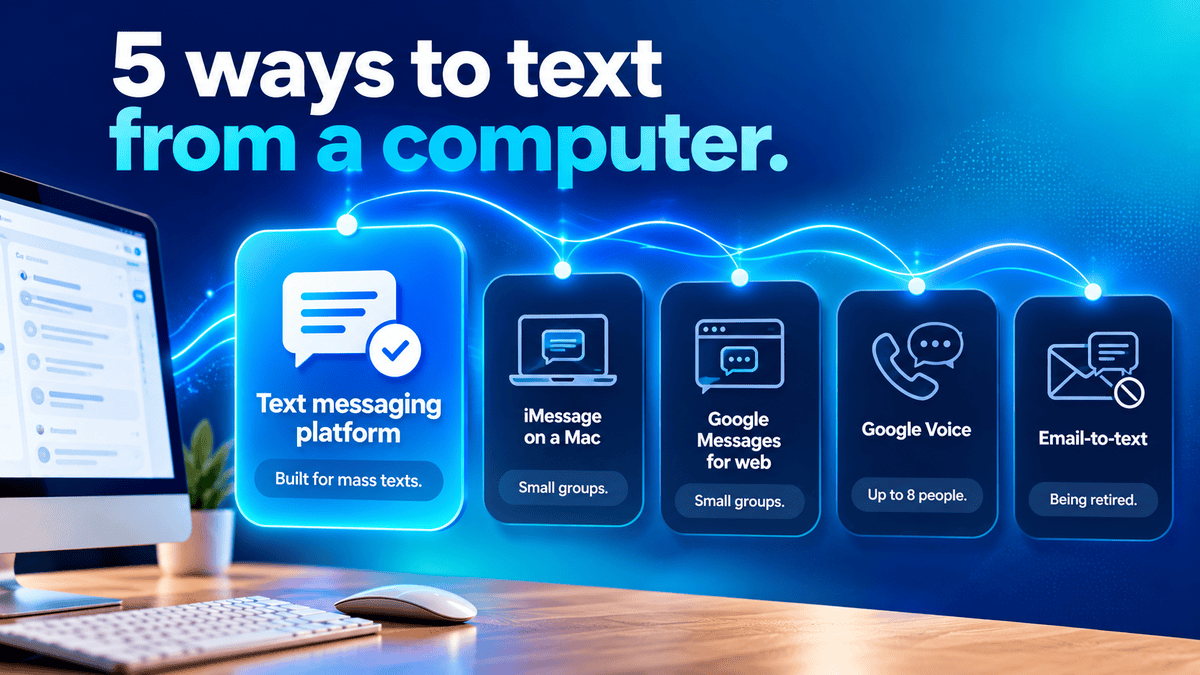
These methods work differently. Only a text messaging platform is built to send mass texts from a computer or laptop to a large contact list. The others are personal messaging tools that work for small groups. In a group text, everyone sees each other and the replies. There is also no opt-out handling.
See the comparison table below:
| Method | Sends one message to a whole contact list | Schedule for later | Opt-in and opt-out handling | Campaign reporting | Sends from |
|---|---|---|---|---|---|
| EZ Texting | Yes | Yes | Yes | Yes | A business number (local 10DLC, toll-free, or short code) |
| iMessage on a Mac | Group chats only | Yes, with Send Later (macOS Sequoia or later, iMessage only, up to 14 days ahead) | No | No | Your Apple Account |
| Google Messages for web | Group chats only | Phone app only | No | No | Your phone number |
| Google Voice | Group texts of up to 8 people | No | No | No | A Google Voice number |
| Email-to-text | One address per person | No | No | No | Your email address |
Below are the steps for each method.
How to Send a Mass Text with a Text Messaging Platform
EZ Texting runs in your web browser, so it works on any desktop or laptop.
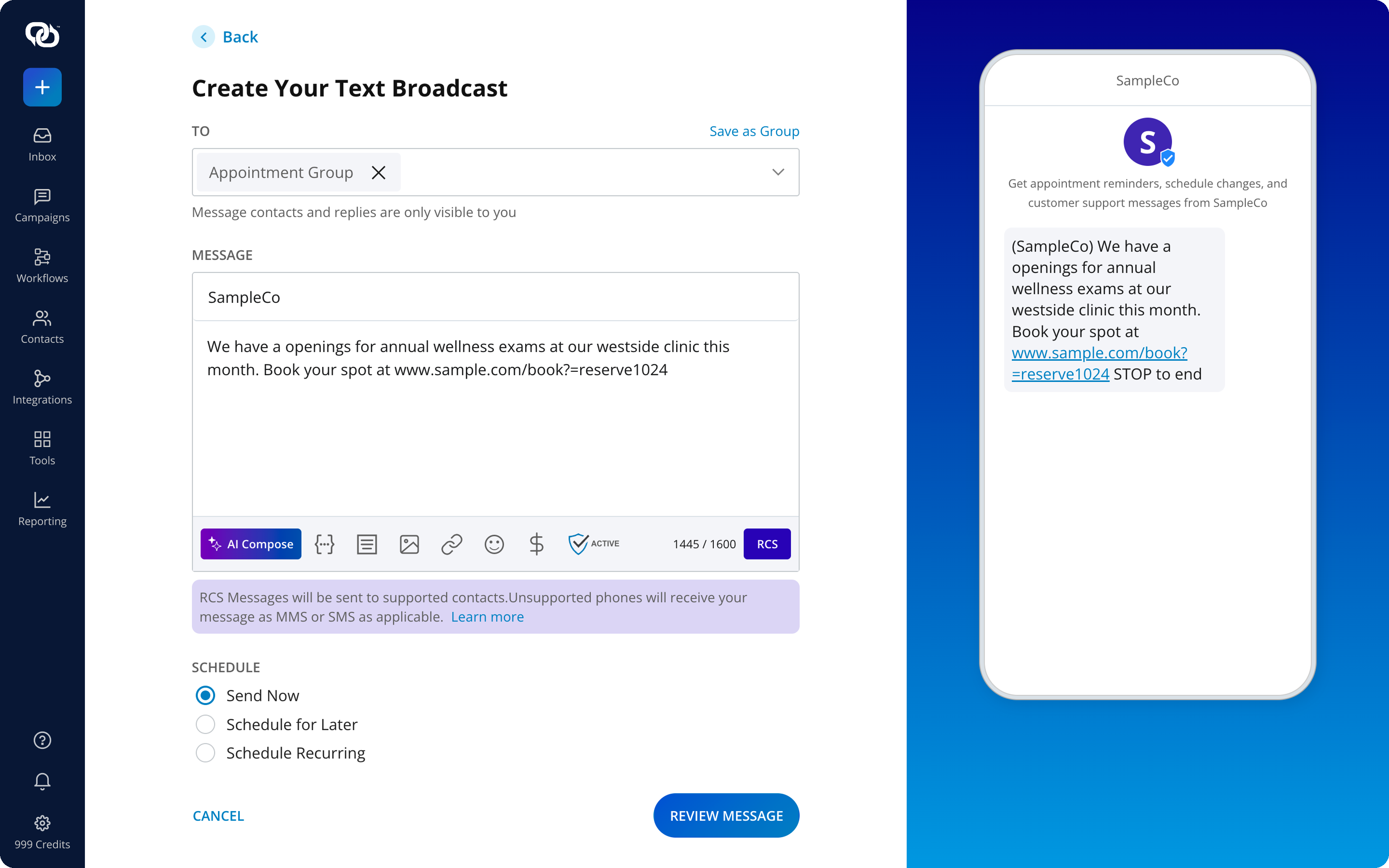
- Sign in to your account on the messaging platform.
- Upload or add your contacts. Make sure every contact has opted in to receive texts from you.
- Select “Send a Text Broadcast.”
- Type in your recipients or contact groups in the “To” field.
- Compose your message in the “Message” field.
- Choose “Send Now,” “Schedule for Later,” or “Schedule Recurring.” If you schedule your message, pick the specific date and time.
- Click “Review Message” and make any necessary edits.
- Click “Send Message” to deliver your text.
Want to try these steps yourself? Start a 14-day free trial, no credit card needed.
Email-to-Text: Mostly Shut Down
Email-to-text used to let you send a text by emailing a phone number at the carrier’s gateway address. Carriers are retiring these gateways, so don’t build a business process on them.
- AT&T shut down email-to-text and text-to-email on June 17, 2025. Emails to @txt.att.net and @mms.att.net no longer arrive as texts.
- Verizon has started shutting down email to vtext.com and vzwpix.com and expects to finish by March 31, 2027. Some senders may lose access before then.
- T-Mobile’s tmomail.net gateway is widely reported as no longer delivering messages. Sprint is now part of T-Mobile.
If you used email-to-text for alerts or reminders, a text messaging platform replaces it. It sends from a registered business number and tracks delivery.
How to Send a Mass Text with iMessage On a Mac
If you use a Mac, such as a MacBook or iMac, iMessage is already built in.
- Open the Messages app on your Mac.
- Sign in with your Apple Account (formerly Apple ID) if asked.
- Click the “Compose” button.
- In the “To” field, type names, phone numbers, or email addresses. Adding more than one person starts a group conversation.
- Type your message and press Return.
To schedule a message on macOS Sequoia or later, click the Apps button next to the message field, then click “Send Later.” Pick a date and time up to 14 days ahead. Scheduling works for iMessage only.
How to Send a Mass Text Using Google Messages for Web
With an Android phone, you can use Google Messages for web to send text messages from your computer. Your phone needs the Google Messages app.
- On your Android phone, open Google Messages, tap your account menu, then tap “Device pairing.”
- On your computer, go to “messages.google.com/web” and sign in with the same Google Account.
- On your phone, tap the emoji that matches the one on your computer screen.
- Start a new conversation, add your recipients, type your message, and send it.
Scheduled messages are set up in the phone app: touch and hold Send, then pick a time.
How to Send a Mass Text with Google Voice
Google Voice gives you a phone number for calls and texts from your web browser. You need a Google Voice number to text. If you don’t have one yet, sign in at “voice.google.com” and follow the prompts to choose one.
- Go to “voice.google.com” and open the Messages tab.
- Click “Send a message.”
- Enter a name or phone number. You can add up to 7 people for a group text (8 people including you).
- Type your message and click Send.
Texts to U.S., Canadian, and Puerto Rican numbers are free.
What About Your Carrier’s Website?
Don’t count on it. AT&T closed its AT&T Messages website on October 31, 2019, and Verizon discontinued its Message+ messaging app in December 2024. For texting from a computer, use one of the options above.
EZ Texting’s Desktop Messaging Platform
With EZ Texting, you send mass texts from the browser on any computer. Import your contacts or sync them from your CRM, sort them into groups, and write messages from a template or with AI Compose. You can add images, schedule one-time or recurring sends, and check results in Reporting. Each contact gets the message on their own, from your business number.
FAQs
Yes, for small groups. iMessage on a Mac, Google Messages for web, and Google Voice are free, but they are built for personal group chats. Google Voice group texts top out at 8 people. To send one message to a large contact list, use a text messaging platform. EZ Texting has a 14-day free trial with no credit card needed.
Not reliably. U.S. carriers are retiring their email-to-text gateways. One major carrier shut its gateway down on June 17, 2025. Verizon expects to finish shutting down vtext.com and vzwpix.com by March 31, 2027. T-Mobile’s gateway is widely reported as no longer delivering.
Yes. iMessage on macOS Sequoia or later can schedule a message up to 14 days ahead with Send Later. EZ Texting lets you schedule any campaign from your computer. Google Messages schedules from the phone app.
In a group text, everyone sees each other and the replies, and there is no opt-out tracking. A mass text from a text messaging platform reaches each person on their own.
Send Your First Mass Text from Your Computer
DermAesthetics, a veteran-owned med spa in Connecticut, saw a 25% increase in booked appointments from its EZ Texting campaigns. Read the case study.
“Every time we send a text message, there’s an uptick in consultations, phone calls, and form submissions. The front desk sees it immediately.”
Michael Guberti, Marketing Manager, DermAesthetics
Start a 14-day free trial, no credit card needed, and send your first mass text from your computer today.
See other related to Features:
See other related to Use Cases:
See other related to Topics: